By Emily Parker
Updated November 2026
If you are searching for the best digital chore chart, you probably want one screen that handles chores, the family calendar and meal ideas without a pile of paper or a stack of sticky notes. This guide compares seven touchscreen digital calendars and chore charts, all sold on Amazon US. Our selection criteria were calendar sync with common services such as Google, Outlook and iCloud, touchscreen usability, the ability to assign chores and rewards to several people, recurring fees, screen size for wall or counter placement, and patterns in owner feedback about setup and reliability. We did not test these devices ourselves; the picks reflect manufacturer specifications and what owners commonly report.
Our top picks at a glance
- 1
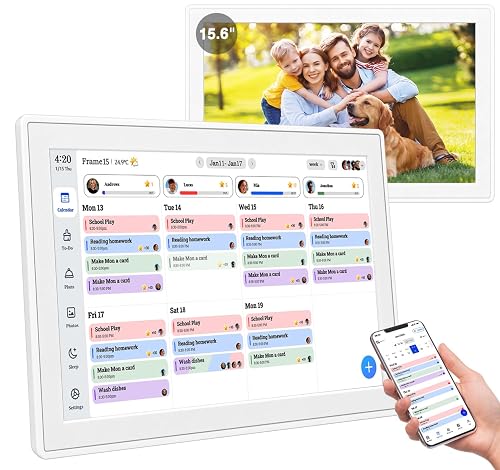 TOP CHOICEBest overall6" Digital Calendar Wall Touch Screen, Chore Chart, Photo Frame, BasesView on Amazon
- 2
 TOP CHOICEBest for families who want a 15.6-inch wall display with photo frame modeDragon Touch 15.6" Digital Calendar & Chore Chart for Family, 1080P SmView on Amazon
- 3
 TOP CHOICEBest for AI meal planning and rewardsWiFi Digital Calendar Smart Family Planner,Chore Charts, Achievement RView on Amazon
- 4
 Best for no-subscription 10.1-inch setupsNo Subscription, Syncs with Google Calendar, Smart Calendar with ChoreView on Amazon
- 5
 Best for voice alerts and large storageNo Subscription Fees, Great for Family Planner, Voice Alerts & ConflicView on Amazon
- 6
 Best budget pickDragon Touch 10.1 inch Digital Calendar Chore Chart – Interactive ToucView on Amazon
- 7
 Best for desk or kitchen counter10.1 Inch Smart Digital Calendar Chore Chart with Touchscreen – InteraView on Amazon
Our Top Picks
Quick Comparison
| Product | Best for | Key feature |
|---|---|---|
| 15.6″ Digital Calendar Wall Touch Screen, Chore Chart, Photo Frame, Bases | Whole-family wall planning | Real-time Google, Outlook and iCloud sync |
| Dragon Touch 15.6″ Digital Calendar & Chore Chart | Large wall display with photo rotation | 1080P touchscreen with cloud sync |
| WiFi Digital Calendar Smart Family Planner | Meal planning and reward systems | AI meal planning and achievement rewards |
| 10.1″ Digital Calendar Touchscreen, Family Wall Planner | Households avoiding monthly fees | No subscription, Google Calendar sync |
| 15.6″ Digital Calendar Wall Touch Screen Family Planner | Families wanting voice reminders | Voice alerts, conflict reminders, 32GB storage |
| Dragon Touch 10.1 inch Digital Calendar Chore Chart | Smaller spaces and budget-conscious buyers | Interactive touchscreen with desk stand |
| 10.1 Inch Smart Digital Calendar Chore Chart with Touchscreen | Kitchen counters and desks | To-do lists and meal planner in one screen |
15.6″ Digital Calendar Wall Touch Screen, Chore Chart, Photo Frame, Bases
Real-time Google, Outlook and iCloud sync keeps every family member organized, with meal planning and no subscription fees. 15.6" Digital Calendar Wall Touch Screen, Chore Chart, Photo Frame, Bases
Best for: Whole-family wall planning with real-time sync
This is a good fit for households that already live in Google, Outlook or iCloud and want every calendar entry, chore and meal plan visible from one wall. The listing highlights real-time sync and meal planning without a subscription fee, which removes one common objection to digital calendars.
Key specs
- 15.6-inch touchscreen display
- Google, Outlook and iCloud calendar sync
- Wall mount and base stand included
- Chore chart and photo frame functions
Pros
- Syncs with several major calendar services at once
- No subscription fees listed
- Large screen is readable from across a kitchen
Cons
- Large footprint may not suit small rentals
- Setup requires a stable home Wi-Fi connection
Bottom line: Best for families who want one central wall display that stays in step with everyone’s existing calendars.
Dragon Touch 15.6″ Digital Calendar & Chore Chart for Family, 1080P Smart Planner with Touchscreen
Dragon Touch 15.6" Digital Calendar & Chore Chart for Family, 1080P Smart Planner with Touchscreen, Real-Time Sync with Google, Outlook & iCloud, No Monthly Fee, Digital Picture Frame, Wall & Desk Mou
Best for: Large wall display with photo rotation
Families who want a bigger display and a photo frame that doubles as a planner will find this one useful. Owners often mention the picture frame function as a reason they keep the screen in a shared room.
Key specs
- 15.6-inch touchscreen
- 1080P resolution
- Google, Outlook and iCloud sync
- Wall and desk mounting options
Pros
- Sharp 1080P display for a planner
- Works as a digital picture frame when not in use
- No monthly fee in the listing
Cons
- Large size can dominate a small wall
- Photo features depend on uploading images through the app
Bottom line: A strong choice for families who want a large, good-looking display that also shows family photos.
WiFi Digital Calendar Smart Family Planner, Chore Charts, Achievement Rewards, AI Meal Planning, 10.1” Black
WiFi Digital Calendar Smart Family Planner,Chore Charts, Achievement Rewards, AI Meal Planning, Smart Touchscreen Interactive Display for Schedules and Cloud Photo Desk Calendar Refills, 10.1'' Black
Best for: Meal planning and reward systems
This model suits families with children who respond well to points or achievement rewards, and households that want help building weekly meal plans on the same screen as chores.
Key specs
- 10.1-inch smart touchscreen
- WiFi connectivity
- AI meal planning feature
- Achievement rewards for chores
Pros
- Combines chores, rewards and meal planning
- Compact 10.1-inch size fits counters
- Touch interface for quick check-offs
Cons
- AI meal suggestions may need manual editing
- Smaller screen is harder to read from across a large room
Bottom line: Best for households that want chores, rewards and meal ideas in a single compact display.
No Subscription, Syncs with Google Calendar, Smart Calendar with Chore Chart, 10.1″ Digital Calendar Touchscreen
No Subscription, Syncs with Google Calendar, Smart Calendar with Chore Chart, Task & Reward, To-dos, Wall & Desktop Use 10.1" Digital Calendar Touchscreen, Family Wall Planner & Picture Frame
Best for: No-subscription 10.1-inch setups
Families who dislike recurring charges and want a mid-size screen for a hallway or kitchen wall will find this design practical. The listing stresses that no subscription is needed.
Key specs
- 10.1-inch touchscreen
- Google Calendar sync
- Chore, task and reward tracking
- Wall or desktop placement
Pros
- No subscription required
- Flexible wall or desk use
- Built-in task and to-do features
Cons
- Sync options are narrower than the 15.6-inch models
- Smaller text can be harder to read at a distance
Bottom line: A good pick for a mid-size household that wants a no-fee system centered on Google Calendar.
No Subscription Fees, Voice Alerts & Conflict Reminder, 32GB Photo Frame 15.6″ Digital Calendar Wall Touch Screen
No Subscription Fees, Great for Family Planner, Voice Alerts & Conflict Reminder, 32GB Photo Frame, Chore Chart, Meal, Reward 15.6" Digital Calendar Wall Touch Screen Family Planner Picture Frames Syn
Best for: Families wanting voice reminders
Busy households that miss reminders in the chaos of morning routines may appreciate the voice alert and conflict reminder features, along with the expanded photo storage.
Key specs
- 15.6-inch touchscreen
- 32GB photo storage
- Voice alerts and conflict reminders
- Chore chart and meal planner functions
Pros
- Voice alerts help with morning reminders
- Generous 32GB photo storage
- Large screen suits wall installation
Cons
- Voice features can be noticed in quiet rooms
- Large size requires a sturdy wall mount
Bottom line: Best for families who want audible reminders and a big shared display.
Dragon Touch 10.1 inch Digital Calendar Chore Chart, Interactive Touchscreen, Smart Family Planner
Dragon Touch 10.1 inch Digital Calendar Chore Chart – Interactive Touchscreen, Smart Family Planner, Hearth Display Desk Digital Calendar Seamless Scheduling Black
Best for: Smaller spaces and budget-conscious buyers
This is the most affordable-feeling option in the set for households that need a simple, compact planner without extra features they will not use.
Key specs
- 10.1-inch interactive touchscreen
- Desk and wall use
- Smart family planner layout
Pros
- Compact size fits small spaces
- Simple interface for children to use
- Works on a desk or wall
Cons
- Fewer advanced features than the larger models
- Smaller screen limits how much is visible at once
Bottom line: A solid budget pick for a single-purpose chore and schedule display.
10.1 Inch Smart Digital Calendar Chore Chart with Touchscreen, Interactive Display for Family Schedules
10.1 Inch Smart Digital Calendar Chore Chart with Touchscreen – Interactive Display for Family Schedules, Great for Organizing Your Calendar to-Do List & Meal Planner, Digital Picture Frame
Best for: Desk or kitchen counter placement
Households that want a dedicated spot on a counter or desk for schedules, to-do lists and meal planning will find this layout convenient.
Key specs
- 10.1-inch touchscreen
- Calendar, to-do list and meal planner functions
- Digital picture frame mode
Pros
- Good for counter or desk placement
- Combines calendar, to-dos and meals
- Picture frame mode when idle
Cons
- Smaller screen limits wall-viewing distance
- Fewer sync options are listed than on the larger wall models
Bottom line: Best for families who want a compact kitchen or desk hub rather than a wall display.
Buying Guide
Calendar sync and platform support
Check which calendar services your family already uses. Most household members rely on one main account, so confirm the device lists that platform before buying. Sync reliability depends on your Wi-Fi connection, so a router placed near the display helps.
Good picks for this: 15.6″ Digital Calendar Wall Touch Screen, Chore Chart, Photo Frame, Bases; Dragon Touch 15.6″ Digital Calendar & Chore Chart
Screen size and viewing distance
A 10.1-inch screen works well on a counter, where people stand a few feet away. A 15.6-inch display reads better from across a room or on a hallway wall. Measure the spot where the screen will hang and mark its footprint with painter’s tape before you order.
Good picks for this: 10.1 Inch Smart Digital Calendar Chore Chart with Touchscreen; 15.6″ Digital Calendar Wall Touch Screen Family Planner
Subscription and ongoing costs
Some devices advertise no subscription, while others may add a service plan for certain features. Read the listing carefully for recurring charges, and note whether photo storage or cloud features require additional payment later.
Good picks for this: No Subscription 10.1″ Digital Calendar Touchscreen; 15.6″ Digital Calendar Wall Touch Screen with 32GB storage
Chore and reward features
If you want children to earn points or rewards, look for an achievement system. Confirm whether chores can be assigned to several people and whether completed tasks reset weekly. Simple check-off features work better for younger kids.
Good picks for this: WiFi Digital Calendar Smart Family Planner; No Subscription 10.1″ Digital Calendar Touchscreen
Meal planning and extra functions
Meal planning, to-do lists and picture frame modes add value only if you will use them. Decide which extras matter before paying for a feature set. A digital picture frame is useful in a shared room but may not be needed in a hallway.
Good picks for this: WiFi Digital Calendar Smart Family Planner; 10.1 Inch Smart Digital Calendar Chore Chart with Touchscreen
Mounting and placement
Wall-mounted models need a stud or a rated anchor. Check the weight listed by the manufacturer and follow their installation instructions. Keep the screen out of direct sunlight to reduce glare and protect the display.
Good picks for this: 15.6″ Digital Calendar Wall Touch Screen with 32GB photo storage; Dragon Touch 10.1 inch Digital Calendar Chore Chart
Care and durability
Clean the touchscreen with a soft, slightly damp microfiber cloth and avoid spraying cleaner directly on the display. Keep the device away from heavy kitchen steam. Check the warranty terms the seller lists before you buy.
Good picks for this: 10.1 Inch Smart Digital Calendar Chore Chart with Touchscreen; Dragon Touch 15.6″ Digital Calendar & Chore Chart
FAQ
Do digital chore charts need a monthly subscription?
Some models are sold as no-subscription devices, while others may offer paid features. Read each listing for recurring fees before purchase.
Which calendar services do these devices usually sync with?
Many listings mention Google Calendar, Outlook and iCloud. Confirm the exact services in the product details, since support varies by model.
What screen size is best for a family of four?
A 15.6-inch display is easier to read from across a room, while a 10.1-inch screen fits counters and desks. Choose based on where the device will be placed.
Can children use a digital chore chart on their own?
Touch interfaces are generally simple for children to use, though younger kids may need help setting up rewards or reading schedules. Test the interface with your children before committing to a rewards system.
Do I need Wi-Fi for a digital chore chart?
Most of these models rely on Wi-Fi for calendar sync and cloud photos. Without a connection, some features may not update.
Can a digital chore chart replace a printed one?
For many families, yes, especially if everyone checks the screen daily. Some households still keep a printed list for younger children who respond to paper checklists. For printable alternatives, see Printable Weekly Chore Chart for Adults: 7 Best Picks for Busy Households (2026).
Is a digital chore chart safe to mount near the kitchen?
Keep the screen away from direct heat, steam and splashes. Mount it at a height children can reach but where small hands will not easily pull it down. If you are unsure about wall anchors or electrical access, consult a qualified installer.
Conclusion
For a whole-family wall hub, the 15.6-inch models with real-time sync are the strongest fit, particularly the top overall pick. Households focused on rewards and meal planning should look at the WiFi Smart Family Planner. Families who want to avoid recurring fees will appreciate the no-subscription 10.1-inch option, while the compact counter model suits a kitchen or desk. If you are still comparing formats, you may also want to read 5 Best Digital Chore Chart Display Options for Busy Families (2026) and 5 Best Digital Chore Chart Touch Screen Options for Busy Families (2026). For families weighing paper against screens, Free Printable Chore Chart for Teens: 6 Best Picks for Busy Families (2026) offers a low-cost alternative.
Sources
- Product safety guidance for wall-mounted electronics and tip-over hazards (cpsc.gov)
- Information on energy use for home electronics and standby power (energy.gov)
- Parenting resources on routines, responsibility and household tasks for children (aap.org)
Related reading
- Top 7 Chore Charts for Family of 4 Picks for Busy Households
- Printable House Chore Chart for Adults: 6 Best Picks for Busy Households (2026)
About Emily Parker
Emily Parker is part of our editorial team and reviews and edits our busy-mom life guides, checking product details against manufacturer specifications and owner feedback.