By Emily Parker
Updated November 2026
A chore chart printable editable template lets you set up a household routine in under an hour and change it whenever your family’s schedule shifts. This guide walks you through choosing a format, filling in tasks, and printing a chart your kids can read at a glance. You will also learn which mistakes cause charts to get ignored within a week.
Step 1: Choose an Editable Format You Can Update Easily
Start with a file type that lets you change text without redesigning the whole page. Word and Google Docs both work well for a printable editable chore chart, and PDF forms work if you only need to fill in names by hand. If you plan to change tasks every month or each season, pick a spreadsheet or document template so you can edit a single cell or line instead of starting over.
Shopping for one? See our guide: 6 Best Free Printable Editable Summer Chore Charts (2026): Our Picks.
For a broader look at file options, see PDF Chore Chart Template: 6 Steps to a Printable Setup Your Family Will Use and Word Chore Chart Template: 7 Steps to a Printable Setup Your Family Will Use.
Step 2: Set Up Columns, Rows, and Layout
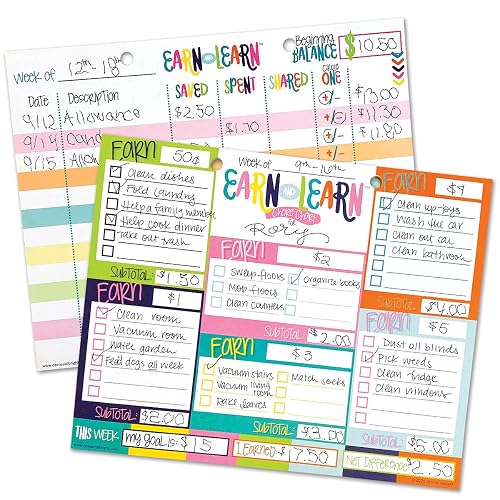
A simple grid works best for most families. Use one row per child or adult and one column per day, then add a final column for weekly rewards or check-offs. Keep the chart to one landscape page so it stays visible on the fridge or wall.
- Use a font size of at least 14 points for names and 12 points for tasks.
- Leave enough room in each cell for a handwritten checkmark or sticker.
- Add a header row with the days of the week, spelled out for older kids.
- Use color blocks, one per person, so each child can find their own row fast.
If your household has younger children, a picture-based layout helps. Compare the options in Visual Chore Chart Free Printable: 7 Steps to a Setup Kids Can Read and Printable Preschool Chore Chart: 7 Best Picks for Busy Families (2026).
Step 3: Assign Tasks by Age and Time Needed
Match each task to the person who can handle it. A four-year-old can put shoes in a basket, while a ten-year-old can load the dishwasher. Keep tasks short and specific, such as “make bed” instead of “clean room.”
| Age Group | Typical Tasks | Suggested Daily Time |
|---|---|---|
| Ages 3 to 5 | Put toys in bin, set napkins, feed pet | 5 to 10 minutes |
| Ages 6 to 9 | Make bed, empty trash, sort laundry | 15 to 20 minutes |
| Ages 10 and up | Load dishwasher, vacuum, cook one simple meal | 20 to 30 minutes |
Rotate heavier jobs weekly so no one gets stuck with the same chore for months. For teens, see Teenage Chore Chart PDF: 7 Steps to a Printable Setup Your Teen Will Follow.
Step 4: Print, Post, and Review Weekly
Print on regular copy paper for a trial week, then move to cardstock or a laminated sheet once the layout is settled. Post the chart at a child’s eye level in a spot you pass daily, like the kitchen or the entry. Spend five minutes every Sunday reviewing what got done and editing the file for the coming week.
If you want a ready-made weekly structure to start from, look at Weekly Chore Chart Printable: A Step-by-Step Setup for Busy Families and Printable Weekly Chore Chart Template: 7 Steps to a Setup That Works.
Recommended gear
- Dry-erase or wet-erase sleeve: Lets you check off tasks and reset the chart each week without reprinting. View on Amazon
- Magnetic frame for the fridge: Holds a printed chart in place and makes it easy to swap in a new version. View on Amazon
- Laminator with pouches: Protects a printed chart from spills and marker wear for repeated use. View on Amazon
Common mistakes
- Listing too many tasks per child. Aim for three to five daily tasks at most.
- Using vague wording like “help out.” Write exact actions instead.
- Skipping the reward step. Pair the chart with a weekly reward or allowance tied to completion.
- Never updating the file. Edit the template every few weeks as kids grow.
- Posting the chart out of sight. If nobody walks past it, nobody uses it.
FAQ
What software do I need to make a chore chart printable editable?
Microsoft Word, Google Docs, or Google Sheets all work for creating and editing a chart. Any of them lets you change names and tasks, then print or save as a PDF.
How many tasks should each child have on a printable chore chart?
Three to five daily tasks suit most children, and younger kids often do well with two or three. Adjust based on age and how much time each task takes.
How often should I update an editable chore chart?
Review it weekly for quick fixes and rebuild the layout every few months as schedules and ages change.
Conclusion
A chore chart printable editable template is only as useful as the routine behind it, so keep tasks specific, age-appropriate, and easy to see. Start with one simple layout, run it for a week, and adjust based on what your family actually completes. Revisit the file regularly and your chart will keep working as your household changes.
Ready to choose one?
About Emily Parker
Emily Parker is part of our editorial team and reviews and edits our busy-mom life guides, checking product details against manufacturer specifications and owner feedback.