 By Audrey Hayes
Updated November 2026
Shared chore lists tend to disappear under school forms and take-out menus, which is why many busy families now look for a digital family chore chart that combines tasks, calendars and reminders in one place. The right screen can replace sticky notes and endless reminders, but only if it syncs with the calendars you already use, is easy for kids to tap and does not lock you into a monthly fee. The picks below were chosen by comparing manufacturer specifications, brand reputation and the patterns owners commonly report: calendar sync with Google, Outlook or iCloud, touchscreen usability, screen size for wall or counter placement, and whether a subscription is required. Use this list as a starting point, then match each model to your household size and wall space.
Best overall: Dragon Touch 15.6″ Digital Calendar & Chore Chart – View on Amazon
Best for large families: Dragon Touch 21.5″ Digital Calendar Chore Chart – View on Amazon
Best for small kitchens: Smart Calendar with Chore Chart 10.1″ Touchscreen – View on Amazon
Best for meal planning: 15.6″ Digital Calendar Wall Touch Screen – View on Amazon
Best for rewards systems: Digital Calendar 10.1-inch Smart Family Wall Planner – View on Amazon
Best budget pick: Dragon Touch 10.1 inch Digital Calendar Chore Chart – View on Amazon
Our Top Picks
Quick Comparison
| Product | Best for | Key feature |
|---|---|---|
| Dragon Touch 15.6″ Digital Calendar & Chore Chart | Most households wanting a wall display | Real-time sync with Google, Outlook and iCloud |
| Dragon Touch 21.5″ Digital Calendar Chore Chart | Large families and command-center walls | Full HD interactive touchscreen at 21.5″ |
| Smart Calendar with Chore Chart 10.1″ Touchscreen | Small kitchens and tight spaces | Task, reward and to-do tracking on a compact screen |
| 15.6″ Digital Calendar Wall Touch Screen | Families who plan meals weekly | Meal planning alongside chores and calendar |
| Digital Calendar 10.1-inch Smart Family Wall Planner | Families using reward-based chores | Task rewards and photo frame mode |
| Dragon Touch 10.1 inch Digital Calendar Chore Chart | Budget-conscious households | Interactive touchscreen with desk or wall mounting |
Dragon Touch 15.6″ Digital Calendar & Chore Chart for Family

Dragon Touch 15.6" Digital Calendar & Chore Chart for Family, 1080P Smart Planner with Touchscreen, Real-Time Sync with Google, Outlook & iCloud, No Monthly Fee, Digital Picture Frame, Wall & Desk Mou
Best for: Most households that want one wall display for the whole family
This model suits families who want a large, readable screen in a hallway or kitchen, with calendar sync and chore tracking on the same display. It is a strong fit for parents who already live in Google Calendar or Outlook and do not want to re-enter events.
Key specs
- 15.6-inch touchscreen
- 1080P resolution
- Wall and desk mounting options
- Real-time sync with Google, Outlook and iCloud
- No monthly fee, per the listing
Pros
- Large screen is easy to read from across a room
- Calendar sync covers the major providers
- No subscription required for core features
Cons
- Setup takes time when connecting several calendar accounts
- Larger footprint than a compact frame
Bottom line: A strong all-round choice for families who want a central wall display and already use a major calendar app.
Dragon Touch 21.5″ Digital Calendar Chore Chart – 1080P Full HD

Dragon Touch 21.5" Digital Calendar Chore Chart – 1080P Full HD Interactive Touchscreen, Smart Family Planner,Real-Time Sync with Google, Outlook & iCloud, No Monthly Fee Wall & Desk Mountable, White
Best for: Large families and households that need a command-center wall
A bigger screen gives more room for multiple family members’ columns, weekly meal plans and shared lists. It works well in a family room or mudroom where several people will check it each day.
Key specs
- 21.5-inch display
- 1080P Full HD resolution
- Interactive touchscreen
- Wall and desk mounting
- Calendar sync with Google, Outlook and iCloud
Pros
- Plenty of space for several family members’ tasks
- Full HD text is sharp at arm’s length
- Mounting options suit both walls and counters
Cons
- Takes up significant wall space
- Heavier to mount, so a sturdy anchor is needed
Bottom line: Best for families of four or more who want a large shared board and have a wall that can carry the weight.
Smart Calendar with Chore Chart, Task & Reward, 10.1″ Touchscreen

No Subscription, Syncs with Google Calendar, Smart Calendar with Chore Chart, Task & Reward, To-dos, Wall & Desktop Use 10.1" Digital Calendar Touchscreen, Family Wall Planner & Picture Frame
Best for: Small kitchens and tight spaces
This compact model fits above a counter or beside a fridge without dominating the room. It suits smaller households or families who mainly need a task list and calendar rather than a full-wall planner.
Key specs
- 10.1-inch touchscreen
- Wall and desktop use
- Google Calendar sync
- Chore, task and reward tracking
- No subscription, per the listing
Pros
- Compact footprint works in kitchens and hallways
- Reward tracking motivates younger children
- Easy to mount in a small space
Cons
- Smaller text can be harder to read from across a room
- Limited space for large families’ schedules
Bottom line: A practical fit for two- to four-person households with limited wall space.
15.6″ Digital Calendar Wall Touch Screen with Meal Planning
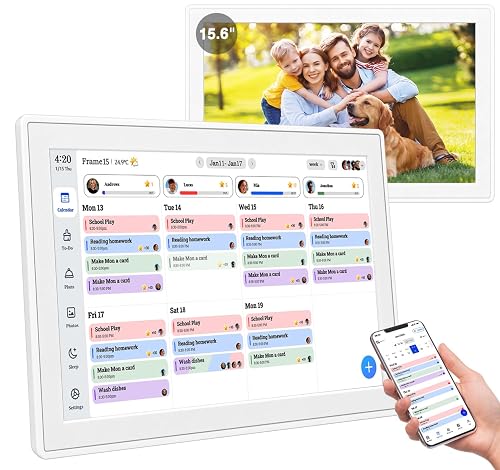
Real-time Google, Outlook and iCloud sync keeps every family member organized, with meal planning and no subscription fees. 15.6" Digital Calendar Wall Touch Screen, Chore Chart, Photo Frame, Bases
Best for: Families who plan meals weekly alongside chores
If dinner planning and chore assignments compete for the same whiteboard, this model combines both on one screen. It is well suited to parents who shop once a week and want the grocery list tied to the calendar.
Key specs
- 15.6-inch touchscreen
- Real-time sync with Google, Outlook and iCloud
- Meal planning and chore charts
- Photo frame function
- Wall and base mounting
Pros
- Meal planning and chores share one screen
- Sync covers the major calendar platforms
- Photo frame mode keeps the display useful between uses
Cons
- Meal planning features are more useful if you already plan weekly
- Large screen needs a clear wall spot
Bottom line: Ideal for families who want meals, chores and appointments managed from a single display.
Digital Calendar 10.1-inch Smart Family Wall Planner & Chore Chart

Digital Calendar, 10.1-inch Smart Family Digital Wall Planner & Chore Chart | No Subscription Electronic Calendar for Family Schedules, Meal Planning & Task Rewards, Photo Frames Perfect Gifts for Mom
Best for: Families using reward-based chore systems
This planner emphasizes task rewards and can double as a photo frame when not in use. It fits households where children earn points or privileges for finishing chores.
Key specs
- 10.1-inch display
- Smart family wall planner layout
- Task and reward tracking
- Photo frame function
- No subscription, per the listing
Pros
- Reward tracking supports consistent habits
- Photo frame mode is useful for family photos
- Moderate size balances readability and space
Cons
- Reward features need a clear system set up in advance
- Fewer calendar integrations are emphasized than on larger models
Bottom line: A good pick for families who want rewards built into their chore routine on a mid-size screen.
Dragon Touch 10.1 inch Digital Calendar Chore Chart – Interactive Touchscreen

Dragon Touch 10.1 inch Digital Calendar Chore Chart – Interactive Touchscreen, Smart Family Planner, Hearth Display Desk Digital Calendar Seamless Scheduling Black
Best for: Budget-conscious households that want a touchscreen chore chart
This is a budget-friendly pick for families who want core digital chore and calendar features without a larger investment. It works on a desk or wall, which makes it flexible for a kitchen counter or home office.
Key specs
- 10.1-inch interactive touchscreen
- Desk and wall mounting
- Smart family planner layout
- Calendar sync, per the manufacturer
Pros
- Easy to place on a desk or wall
- Covers the essentials: calendar and chores
- Compact enough for shared spaces
Cons
- Smaller text may be hard to read from across the room
- Fewer extras than the premium options
Bottom line: A sensible starting point for a household trying digital chores for the first time.
Buying Guide
Screen Size and Viewing Distance
Measure the distance from where the display will hang to the spot where most people stand or sit. Many users find that text on a 10-inch screen is readable within about three to four feet, while a 15- to 21-inch screen works better for a hallway or family room. Larger screens also give room for more columns and names.
Good picks for this: Dragon Touch 15.6″ Digital Calendar & Chore Chart, Dragon Touch 21.5″ Digital Calendar Chore Chart
Calendar Sync and Platform Compatibility
Confirm which calendar apps each adult uses before buying. Look for listings that name Google Calendar, Outlook and iCloud explicitly. If one family member uses a different app, check whether the device supports it or whether a workaround is needed.
Good picks for this: 15.6″ Digital Calendar Wall Touch Screen, Dragon Touch 15.6″ Digital Calendar & Chore Chart
Subscription Requirements
Read the listing and product page carefully to see whether core features require a paid plan. Several models advertise no monthly fee, which keeps long-term costs predictable. Check for any optional cloud or premium features that might change this.
Good picks for this: Smart Calendar with Chore Chart 10.1″ Touchscreen, Digital Calendar 10.1-inch Smart Family Wall Planner
Touchscreen Responsiveness and Kid-Friendliness
If children will tap the screen daily, look for an interactive touchscreen described as responsive. Consider how easily a child can reach the display and whether the layout uses large, clear buttons for checking off chores.
Good picks for this: Dragon Touch 10.1 inch Digital Calendar Chore Chart, Digital Calendar 10.1-inch Smart Family Wall Planner
Mounting Options and Wall Space
Choose a model that matches your wall or counter. Wall-mounted units need a stud or proper anchors, especially at larger sizes. Desk or base mounts suit renters or spaces where drilling is not an option.
Good picks for this: Dragon Touch 21.5″ Digital Calendar Chore Chart, Smart Calendar with Chore Chart 10.1″ Touchscreen
Extra Features: Meal Planning, Rewards and Photos
Decide whether you need extras such as meal planning, reward tracking or a photo frame. These features add value only if your household will use them every week. Otherwise, a simpler display may be easier to maintain.
Good picks for this: 15.6″ Digital Calendar Wall Touch Screen, Digital Calendar 10.1-inch Smart Family Wall Planner
Care and Cleaning
Touchscreens collect fingerprints and food residue. Plan to wipe the glass with a soft, dry microfiber cloth, and use a lightly dampened cloth only if the manufacturer allows it. Avoid spraying cleaner directly on the screen. Check the product manual for specific care instructions.
Good picks for this: Dragon Touch 15.6″ Digital Calendar & Chore Chart, Dragon Touch 10.1 inch Digital Calendar Chore Chart
FAQ
What is a digital family chore chart?
A digital family chore chart is an electronic display, usually a touchscreen or smart frame, that shows chores, schedules and reminders for everyone in the household. Many models sync with online calendars so events appear alongside tasks.
Do I need a monthly subscription for a digital chore chart?
Not always. Several models advertise no monthly fee for core features. Check each listing and product page to confirm which features, if any, require a paid plan.
Can kids use a digital chore chart on their own?
Many touchscreen models let children check off tasks, but younger kids may need help setting up tasks and rewards. Choose a screen height and size that children can reach comfortably.
Which calendar apps do these displays usually support?
Listings for several models name Google Calendar, Outlook and iCloud. Confirm your family’s specific apps before purchase, since compatibility varies by model.
Is a digital chore chart better than a printable one?
It depends on your routine. Digital charts sync with calendars and offer reminders, while printable charts cost less and need no setup. Many families start with printable options and move to digital when they want calendar integration. For printable ideas, see Free Printable Family Chore Chart Template: 7 Steps to a Setup That Sticks.
Where should I mount a digital family chore chart?
Place it at eye level in a spot everyone passes, such as the kitchen or entryway. Make sure wall-mounted units are secured to studs or proper anchors. If you are comparing screen types, see 5 Best Digital Chore Chart Display Options for Busy Families (2026).
How do I keep kids motivated to use a digital chore chart?
Set clear expectations, use reward tracking if it fits your values, and review progress weekly. Consistency matters more than the device itself. For reward-based systems, see Money Chore Chart with Prices: 6 Best Options for Busy Families (2026).
Conclusion
A digital family chore chart can replace scattered notes with one shared, up-to-date display. For most busy households, the Dragon Touch 15.6″ model offers a balanced mix of screen size and calendar sync. Large families may prefer the 21.5″ option for more room, while small kitchens often suit the 10.1″ touchscreen. Families who plan meals weekly should look at the 15.6″ model with meal planning, and those who rely on rewards may prefer the 10.1-inch wall planner. Budget-minded households can start with the Dragon Touch 10.1″ chore chart and upgrade later if needed. Match the screen size, sync options and mounting to your space and routine, and check each listing for current features.
Sources
- Safety guidance on mounting and tip-over hazards for wall-mounted and tabletop electronics (cpsc.gov)
- Information on energy use of household electronics and display devices (energy.gov)
- Parenting resources on routines, household responsibilities and children's chores (aap.org)
Related reading
About Audrey Hayes
Audrey Hayes is part of our editorial team and reviews and edits our busy-mom life guides, checking product details against manufacturer specifications and owner feedback.