As an Amazon Associate I earn from qualifying purchases. This page may contain affiliate links.
A family organization board digital display replaces the paper calendar that gets buried under permission slips and takeout menus. It puts the whole week on one screen where everyone can see it, and it can handle shared chores, meal plans and photos at the same time. If you are a busy parent trying to keep school pickups, soccer practice and dinner plans straight, a digital board can cut down on the “wait, what time is it?” texts. This guide compares 10 options so you can match a board to your household size, your calendar apps and your wall space.
Every model here was chosen by reviewing manufacturer specifications, brand reputation and common patterns in owner feedback. We did not test these devices ourselves. The criteria we weighted most were calendar sync with Google, Outlook or iCloud, touchscreen usability for kids, chore and meal planning features, screen size and mounting options, and whether ongoing subscription fees are required. Where a listing does not clearly state a feature, we left it out rather than guess.
Our Top Picks
Quick Comparison
| Product | Best for | Key feature |
|---|---|---|
| Dragon Touch 15.6″ Digital Calendar & Chore Chart | Large households wanting a wall-sized board | Real-time sync with Google, Outlook and iCloud |
| Smart Digital Calendar 10.1 Inch Electronic Family Calendar Planner | Families with limited wall space | Shared chore chart and meal planner on a 10.1-inch touchscreen |
| 15.6″ Digital Calendar Wall Touch Screen (multi-calendar sync) | Parents juggling several calendar apps | Syncs multiple calendar accounts with no subscription fees |
| Chore List and Meal & Family Task Manager Digital Calendar 10.1″ | Households focused on task and chore tracking | Third-party calendar sync with built-in picture frame |
| Dragon Touch 15.6″ 1080P Smart Planner | Full HD display for family hubs in kitchens | 1080P touchscreen with Google, Outlook and iCloud sync |
| Memoryboard Digital Reminder Board for Seniors, 10.1 Inch | Grandparents and caregivers | Remote messages and photos from family via app, nothing to tap |
| Dragon Touch 10.1 inch Digital Calendar Chore Chart | Desk or counter placement | Interactive touchscreen in a desk-style display |
| Smart Electronic Planner Calendar with Chore Tracker and Meal Plan | Parents who want auto-rotating photos | Auto-rotate digital photo frame with calendar and chore tracker |
| Digital Calendar 10.1 Inch Electronic Calendar for Family Schedules | Mid-size families wanting a compact board | Chore chart, meal planner and digital picture display |
| 15.6 Inch Smart Digital Calendar 1920×1080 Full HD Touchscreen | Families wanting a large, clear wall display | Full HD 1920×1080 touchscreen with chore chart and meal planner |
15.6″ Digital Calendar Wall Touch Screen, Chore Chart, Photo Frame, Bases
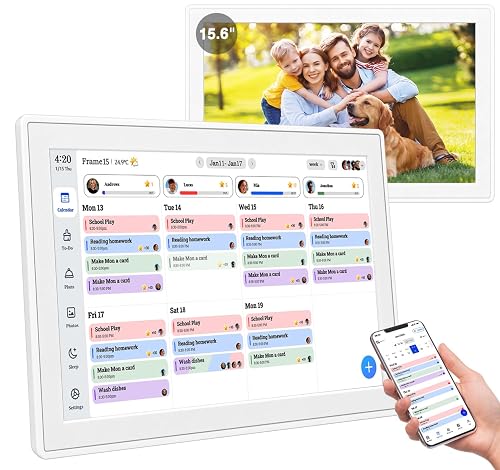
Real-time Google, Outlook and iCloud sync keeps every family member organized, with meal planning and no subscription fees. 15.6" Digital Calendar Wall Touch Screen, Chore Chart, Photo Frame, Bases
This model suits families who want a large, central board that syncs with several calendar accounts. It works well in a kitchen or hallway where everyone passes through each day.
Key specs
- 15.6-inch touchscreen display
- Real-time sync with Google, Outlook and iCloud calendars
- Chore chart and meal planning features
- Includes photo frame function and bases for placement
Pros
- Large screen is readable from across the room
- Calendar sync reduces manual entry across devices
- Photo frame mode keeps the display useful when idle
Cons
- Large footprint needs a dedicated wall space
- Setup of multiple calendar accounts can take some patience
Smart Digital Calendar 10.1 Inch Electronic Family Calendar Planner

Smart Digital Calendar 10.1 Inch, Electronic Family Calendar Planner with Touchscreen, Shared Chore Chart, Meal Planner, To Do List & Schedule Board, WiFi Digital Family Command Center, Photo Frame
This is a good match for families short on wall space who still want a shared chore chart, meal planner and to-do list in one place.
Key specs
- 10.1-inch touchscreen
- WiFi connectivity
- Shared chore chart, meal planner and to-do list
- Photo frame function
Pros
- Compact size fits kitchens and entryways
- Combines calendar, chores and meals in one interface
- Touch controls make it easy for older kids to update tasks
Cons
- Smaller text may be harder to read from a distance
- Fewer calendar sync options are emphasized than on larger models
15.6″ Digital Calendar Wall Touch Screen, Chore Chart, Meal Planner, Bases

Seamlessly Sync Multiple Calendar Apps to Keep Family Organized, Display Memories with Digital Frame, No Subscription Fees. 15.6" Digital Calendar Wall Touch Screen, Chore Chart, Meal Planner, Bases
Parents who manage several separate calendar apps, such as a work account and a school account, will find this model’s sync focus useful.
Key specs
- 15.6-inch touchscreen
- Syncs multiple calendar apps
- Chore chart and meal planner
- Digital frame function and bases included
Pros
- Consolidates several calendars into one view
- No subscription fees mentioned in the listing
- Large display suits family command-center use
Cons
- Requires a wall or stable stand with enough clearance
- Initial account linking can be time-consuming
Chore List, Meal & Family Task Manager Digital Calendar 10.1″ Touchscreen

Chore List, Meal & Family Task Manager, Third-Party Calendar Sync, Picture Frame – Perfect Gifts for Mom & Women Digital Calendar 10.1" Touchscreen, Smart Electronic Wall Planner
This board leans toward task management. It fits households where chores and meal planning are the main pain points, rather than appointment-heavy schedules.
Key specs
- 10.1-inch touchscreen
- Chore list and family task manager
- Third-party calendar sync
- Picture frame function
Pros
- Task-first layout helps kids see their own assignments
- Compact size works on counters and desks
- Picture frame mode adds a personal touch
Cons
- Smaller screen limits how much a family can see at once
- Calendar sync details should be confirmed in the listing before buying
Dragon Touch 15.6″ Digital Calendar & Chore Chart for Family, 1080P Smart Planner

Dragon Touch 15.6" Digital Calendar & Chore Chart for Family, 1080P Smart Planner with Touchscreen, Real-Time Sync with Google, Outlook & iCloud, No Monthly Fee, Digital Picture Frame, Wall & Desk Mou
This is a strong choice for families who want a sharp, full HD display in a high-traffic room and do not want to pay a monthly fee to keep calendars syncing.
Key specs
- 15.6-inch touchscreen
- 1080P resolution
- Real-time sync with Google, Outlook and iCloud
- Digital picture frame function, wall and desk mounting
Pros
- 1080P display keeps text sharp at wall distance
- Works with the three most common calendar ecosystems
- Can be mounted on a wall or set on a desk
Cons
- Large size may be more than a small kitchen needs
- Touch response can vary with screen smudges, so routine cleaning helps
Memoryboard Digital Reminder Board for Seniors, 10.1 Inch

Send Messages, Reminders, & Photos From Family & Caregiver App, Easy-to-Read Display, Nothing to Tap, No Subscription Needed Memoryboard Digital Reminder Board for Seniors, 10.1 Inch
This board is designed for a different audience: older relatives or caregivers who need simple, nothing-to-tap reminders. It fits a multigenerational household where grandparents need to see family updates without navigating menus.
Key specs
- 10.1-inch display
- Family and caregiver app to send messages, reminders and photos
- Designed for easy reading with no tapping required
- No subscription needed according to the listing
Pros
- Remote updates from family members via app
- Simple display reduces confusion for less tech-savvy users
- No tapping needed for viewing reminders
Cons
- Not built for shared chore tracking or meal planning
- Works best when every family member is set up on the app
Dragon Touch 10.1 inch Digital Calendar Chore Chart

Dragon Touch 10.1 inch Digital Calendar Chore Chart – Interactive Touchscreen, Smart Family Planner, Hearth Display Desk Digital Calendar Best Gifts for Christmas, Wedding, Mom
This smaller desk-style display suits families who want an interactive board on a counter or small table rather than mounted on a wall.
Key specs
- 10.1-inch interactive touchscreen
- Smart family planner with chore chart
- Desk-style display stand
Pros
- Desk placement needs no wall mounting
- Touch interface suits kids updating their own chores
- Compact footprint works in tight kitchens
Cons
- Smaller screen may be harder to read from across a room
- Fewer advanced sync details appear in the listing title
Smart Electronic Planner Calendar Sync, Chore Tracker, Meal Plan Family Digital Photo Frame

Smart Electronic Planner Calendar Sync, Chore Tracker,Meal plan Family Digital photo Frame Auto-Rotate Gift for Mom Women Digital Calendar 10.1 Inch Wall Plan Touch Screen WiFi picture esay to use
This board works well for families who want the photo frame to rotate memories while the calendar, chores and meal plan stay visible.
Key specs
- 10.1-inch touchscreen display
- Calendar sync and chore tracker
- Meal plan function
- Auto-rotate photo frame and WiFi connectivity
Pros
- Auto-rotating photos keep the board from looking like a plain schedule
- Combines calendar, chores and meal plans
- Easy touch controls for everyday use
Cons
- Smaller display may limit the amount of detail visible at once
- Confirm calendar sync options before purchase if you use a specific app
Digital Calendar 10.1 Inch Electronic Calendar for Family Schedules

Digital Calendar, 10.1 Inch Electronic Calendar for Family Schedules, Smart Touchscreen Interactive Family Planner with Chore Chart, Meal Planner, Digital Picture Display, Gift for Mom Dad Mother (Woo
This compact board fits mid-size families who want a chore chart, meal planner and photo display in one unit at a moderate size.
Key specs
- 10.1-inch touchscreen
- Smart interactive family planner
- Chore chart and meal planner
- Digital picture display function
Pros
- Good balance of size and function for mid-size households
- Picture display keeps the board engaging
- Covers schedules, chores and meals together
Cons
- Smaller screen can feel crowded with a large family’s events
- Mounting options should be checked against your wall setup
15.6 Inch Smart Digital Calendar 1920×1080 Full HD Touchscreen

15.6 Inch Smart Digital Calendar – 1920×1080 Full HD Touchscreen Calendar & Family Planner with Chore Chart & Meal Planner, Wall-Mountable (Black White)
This is a large, high-resolution wall board for families who want the clearest possible display for a busy hallway or kitchen command center.
Key specs
- 15.6-inch touchscreen
- 1920×1080 Full HD resolution
- Chore chart and meal planner
- Wall-mountable, available in black or white
Pros
- Full HD resolution keeps small text crisp
- Large size is easy to read from across the room
- Wall-mountable design saves counter space
Cons
- Needs a stable wall location and clear space
- Larger footprint may be more than a small apartment needs
Buying Guide
Selection Criteria to Start With
Before comparing models, decide what the board must do for your household. A family of three with two school calendars has different needs than a family of six with sports schedules and shared chores. Start with three questions: Which calendars do we already use? Where will the board live? Who will update it most often?
Important Features
- Calendar sync: Check whether the board works with Google, Outlook or iCloud, since those cover most households. If you use a different app, confirm support in the listing.
- Touchscreen usability: If kids will update chores, look for a responsive touch interface and a layout that is easy to navigate.
- Chore and meal planning: A shared chore chart and meal planner keep daily tasks in one place and reduce the number of separate lists on the fridge.
- Photo frame mode: Useful for keeping the screen lively and for family memories when the board is idle.
- Mounting options: Wall mounting frees counter space, while desk bases suit rentals or flexible setups.
Specs to Check
- Screen size: 10.1 inches suits counters and entryways; 15.6 inches suits a wall command center.
- Resolution: Full HD (1920×1080) keeps text readable at a distance.
- Subscription requirements: Confirm whether any features need a paid plan before buying.
- Power and placement: Check the cord length and whether the unit needs an outlet near the mounting spot.
Choosing by Need
If your main goal is calendar sync across several accounts, prioritize models that explicitly list Google, Outlook and iCloud support. If your main goal is chores and kids’ independence, favor a touch-first chore chart. If you have grandparents or caregivers who need simple reminders, a reminder-focused board with remote messaging is a better fit than a full family planner.
For small homes, a 10.1-inch board on the counter or by the back door often works best. For large families or a kitchen that doubles as a command center, a 15.6-inch wall board gives everyone a clear view. Consider the reading distance: a good rule is to make sure the text is readable from the spot where your family usually stands when checking the schedule.
Things to Watch Out For
- Setup time can be significant when linking several calendar accounts, so plan an evening for it.
- Screens can attract fingerprints, so a soft microfiber cloth and occasional cleaning keep the display readable.
- Kids may need a few days to learn the touch controls. Set clear rules about who updates what.
- Wi-Fi reliability matters. A board that drops connection will show outdated events.
- Read recent owner feedback for patterns about sync reliability and customer support rather than relying on a single review.
FAQ
What is a family organization board digital display?
It is a touchscreen or display device mounted on a wall or set on a counter that shows a shared family calendar, chore chart, meal plan and sometimes photos. Most models sync with online calendar accounts so updates appear automatically.
Do digital family boards need a monthly subscription?
Some do and some do not. Several listings in this guide state no subscription is needed, but you should always confirm the current requirements on the product page before buying, since features can change.
Which calendar apps do most digital boards support?
Google Calendar, Outlook and iCloud are the most commonly supported. If your family uses a different app, check the listing for the exact compatibility before purchasing.
What screen size should I choose?
A 10.1-inch display works well on a counter or in an entryway for small to mid-size households. A 15.6-inch display suits a wall command center or a large family that needs to read the schedule from across a room.
Can kids use the touchscreen to update chores?
Yes, most models with a chore chart allow family members to mark tasks complete on the touchscreen. Setting simple rules about who updates which tasks helps the system stay accurate.
Are digital family boards good for seniors?
Some are designed specifically for that purpose. Reminder boards with remote messaging from family members and a no-tap display can help older relatives stay informed without navigating complicated menus.
How do I keep the board working well?
Keep the Wi-Fi connection stable, clean the screen regularly, and check that calendar accounts remain linked after password changes. If something stops syncing, consult the manufacturer’s support resources.
Conclusion
A family organization board digital display can take the mental load off a busy household by putting the schedule, chores and meals in one visible place. For large families and multi-calendar households, the 15.6-inch models with broad sync support, such as the Dragon Touch 15.6″ 1080P Smart Planner or the 15.6″ Digital Calendar Wall Touch Screen with multi-calendar sync, make the most sense. For smaller homes and counter placement, the 10.1-inch options such as the Smart Digital Calendar 10.1 Inch Electronic Family Calendar Planner or the Digital Calendar 10.1 Inch Electronic Calendar for Family Schedules are a practical fit. If grandparents or caregivers are part of the plan, the Memoryboard reminder board is built for that purpose.
Whichever you choose, start by mapping your calendar accounts and deciding who will update the board. A clear setup plan will matter more than any single feature. For more ideas on keeping the household running, see Family Organization System: Calendars, Plans, Checklists, Setting Up a Family Calendar Everyone Can Follow, Sharing Chores as a Family: Age-Appropriate Tasks and Using a Family Planner to Keep Track of It All.