As an Amazon Associate I earn from qualifying purchases. This page may contain affiliate links.
Most busy families do not need more information. They need it in the right place at the right time: who is picking up whom, what is for dinner, which permission slip is due Friday, and whether anyone remembered the cleats. Apps for family organization can pull those threads together on phones that everyone already carries, but only if the app matches how your household actually runs. This guide compares ten options with the criteria that matter most to working parents: shared calendars that every adult and teen will open, task and chore assignment, shopping and meal coordination, reminders that do not get buried, privacy controls for kids’ data, and how well each app works across iPhone and Android. Nothing here is based on personal testing. The picks reflect published specifications, brand track records, and common patterns in owner feedback, so treat them as a starting shortlist rather than a verdict.
Our Top Picks
Quick Comparison
| Product | Best for | Key feature |
|---|---|---|
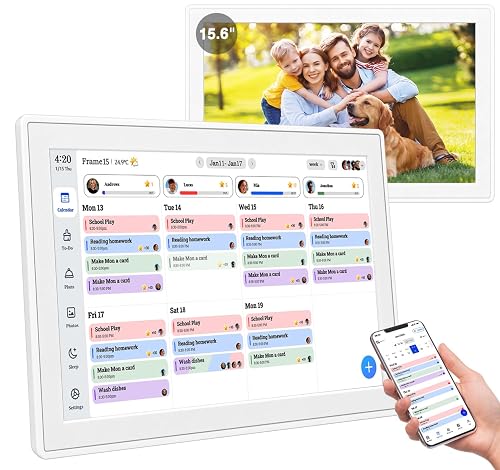
| Cozi Family Organizer | Families who want one simple shared hub | Shared calendar, lists and a family message board |
| Google Calendar | Families already living in Gmail and Android | Shared calendars with color-coded family members |
| Apple Calendar with iCloud Sharing | Households that run mainly on iPhone | Shared calendars and reminders across Apple devices |
| OurHome | Parents who want chores tied to rewards | Chore assignment with a points system |
| FamilyWall | Families wanting calendar, lists and location in one app | Shared family calendar with a location feature |
| AnyList | Households focused on groceries and meal planning | Shared grocery lists that sync in real time |
| Todoist | Parents who manage many recurring tasks | Recurring tasks and shared projects |
| Any.do | Adults who want reminders and daily planning | Daily planner with task and calendar combined |
| Trello | Families who like visual boards for projects | Kanban-style boards with cards and checklists |
| Microsoft To Do | Families using Outlook and Microsoft 365 | Shared lists that connect with Outlook calendar |
Cozi Family Organizer
Cozi is built specifically for families, which makes it the most direct answer to the search for an app for family organization. It suits parents who want a single place for the calendar, shopping list, to-do items, and a message board without learning a complicated tool.
Key specs
- Shared family calendar with per-member color coding
- Shared shopping and to-do lists
- Family message board and weekly meal planner
- Available on iOS, Android and the web
Pros
- Designed around family life rather than general productivity
- Simple layout that older children can follow easily
- Meal planning and lists sit alongside the calendar
Cons
- Less flexible than general task managers for complex workflows
- Some owners report wanting more customization in reminders
Google Calendar
Google Calendar is the most widely used shared calendar and a strong choice for families already on Gmail, Google Workspace or Android. It works best as the backbone of your schedule, with other apps layered on top.
Key specs
- Multiple shared calendars with access levels (view, edit, manage)
- Event reminders and notifications on all devices
- Works through web, iOS and Android apps
- Free to use with a Google account
Pros
- Familiar interface that most adults already know
- Strong reminder system for appointments and pickups
- Easy to share a single calendar with a spouse or caregiver
Cons
- Not built for chores, lists or meal planning
- Teens may need guidance to manage their own accounts safely
Apple Calendar with iCloud Sharing
Apple’s built-in Calendar and Reminders apps, synced through iCloud, give iPhone-based families a capable shared system at no extra app cost. This pick fits households where every adult and most teens use Apple devices.
Key specs
- Shared iCloud calendars and reminder lists
- Family Sharing for shared subscriptions and location
- Siri support for adding events and reminders by voice
- Syncs across iPhone, iPad and Mac
Pros
- Already installed on Apple devices
- Shared reminder lists work well for grocery and chore items
- Voice entry is quick when hands are full
Cons
- Limited value for Android users in the household
- No built-in chore rewards or meal planner
OurHome
OurHome focuses on chores and household routines, with a points-based reward system that appeals to parents of elementary-age children. It fits families who want chore assignment to be the main job of the app.
Key specs
- Chore assignment with due dates and recurring schedules
- Points system that can be tied to rewards
- Separate views for each family member
- Available on iOS and Android
Pros
- Makes chore tracking visible without constant nagging
- Recurring tasks reduce setup time each week
- Kids can check off their own jobs
Cons
- Narrower focus than a full family organizer
- Owners sometimes want more flexible reward options
FamilyWall
FamilyWall combines a shared calendar, lists, photos and location sharing in one app. It suits families who want an all-in-one hub and are comfortable sharing location with trusted members.
Key specs
- Shared family calendar and to-do lists
- Location sharing for family members who opt in
- Shared photo albums and notes
- Available on iOS and Android
Pros
- Several features in one place reduces app switching
- Location sharing helps with pickup coordination
- Good for extended family groups
Cons
- Location features raise privacy questions for some families
- Can feel busy for households that only want a calendar
AnyList
AnyList is a grocery and recipe list app that syncs instantly between family members’ phones. It is a strong pick for parents whose biggest organizational pain is the weekly shop and dinner planning.
Key specs
- Shared grocery lists with real-time sync
- Recipe import and meal planning tools
- Categories that follow store aisle layout
- Available on iOS, Android and the web
Pros
- Lists update instantly when someone checks an item off
- Recipe import saves retyping favorite meals
- Aisle sorting cuts time in the store
Cons
- Does not handle calendars or chores
- Full feature set may require a paid upgrade
Todoist
Todoist is a task manager with strong support for recurring tasks and shared projects. It fits parents who juggle many repeating responsibilities and want them to reappear on schedule.
Key specs
- Recurring task scheduling with natural-language entry
- Shared projects with assignees and comments
- Priority levels and filters
- Available on iOS, Android, web and desktop
Pros
- Recurring tasks handle routines like trash day well
- Natural-language entry is fast to use
- Works across most devices
Cons
- Interface can feel dense for younger children
- Some useful features sit behind a paid tier
Any.do
Any.do blends a task list with a daily planner and calendar view. It suits adults who want a morning overview of the day’s commitments in one screen.
Key specs
- Daily planner that combines tasks and calendar events
- Reminders with recurring options
- Shared lists for household members
- Available on iOS, Android and web
Pros
- Good daily overview for a busy adult
- Simple interface with few settings to manage
- Shared lists help with household errands
Cons
- Less suited to managing whole-family schedules
- Advanced features require a subscription
Trello
Trello organizes work into boards, lists and cards, which some families find useful for long projects like a move, a renovation or summer camp planning. It is less natural for daily routines.
Key specs
- Boards with lists and cards
- Checklists, due dates and attachments on cards
- Board sharing with multiple members
- Available on iOS, Android and web
Pros
- Visual layout suits multi-step projects
- Easy to see the status of each task at a glance
- Free tier covers basic family use
Cons
- Not designed for daily calendars or recurring chores
- Learning the board structure takes some setup time
Microsoft To Do
Microsoft To Do is a free list app that ties into Outlook and Microsoft 365. Families already working in Microsoft’s ecosystem will find it the least disruptive addition.
Key specs
- Shared task lists with assignments
- Reminders and recurring tasks
- Integration with Outlook calendar
- Available on iOS, Android, Windows and web
Pros
- Connects with Outlook calendar events
- Clean, minimal interface
- Works across Windows and mobile
Cons
- Less useful if the family does not use Microsoft accounts
- No meal planning or chore rewards
Buying Guide
Choosing among apps for family organization is less about finding the most features and more about finding the fewest apps that cover your real needs. Every extra app is one more thing to open, and an app nobody checks does nothing for your week.
Selection criteria to start with
- Shared access: Can every adult, and any teen who needs it, see and edit the same information?
- Device coverage: Does it run on the phones your family already uses, or only on one platform?
- Notifications: Can you control reminders so important items are not lost in noise?
- Privacy: Review what data is collected, especially for children, and whether location sharing is optional.
- Learning curve: Can a grandparent or older child use it with a short explanation?
Important features to look for
- A shared calendar with color coding by person
- Recurring tasks for trash day, laundry, and medication reminders
- Shared lists that sync in real time
- Offline access, so the list is visible in a parking garage or store with weak signal
- Export or backup options, so information is not locked in one app
Specs to check before you buy or sign up
- Maximum number of members on a shared account
- Which features are free and which require a subscription
- Platform support (iOS, Android, web)
- Data storage location and account recovery options
Choosing by need
- One simple family hub: Cozi or Google Calendar
- Chores and rewards: OurHome, paired with a shared calendar
- Groceries and meals: AnyList, paired with your main calendar
- Recurring personal tasks: Todoist or Any.do
- Apple-only households: Apple Calendar with iCloud Sharing
Things to watch out for
- Duplicate entries across two apps. Pick one system for the calendar and stick to it.
- Free trials that convert to paid plans without a clear reminder.
- Location sharing left on by default. Review settings for every family member.
- Kids’ accounts with public profiles or unrestricted messaging.
For ideas on structuring the system itself, see Family Organization System: Calendars, Plans, Checklists and Using a Family Planner to Keep Track of It All. If your family is still deciding how to split work, Sharing Chores as a Family: Age-Appropriate Tasks offers a useful starting point. For a broader look at physical tools that pair with apps, read Family Organization Products: What Actually Helps.
FAQ
Do I need more than one app for family organization?
Many families use one shared calendar app plus one list or chore app. Trying to make a single tool do everything often leads to neglected features. Keep the number of apps small enough that everyone checks them daily.
Which app works best for a family with both iPhone and Android users?
Google Calendar, Cozi, AnyList and FamilyWall all run on both iOS and Android. Apple Calendar with iCloud Sharing is the most limited choice for mixed households, since it depends on Apple devices.
Are family organization apps safe for children to use?
They can be, with supervision. Review each app’s privacy settings, turn off public sharing, limit messaging for younger children, and check whether location features can be disabled. Consult your school or local guidance if you have specific concerns about digital safety.
How do I get teenagers to actually use a shared app?
Involve them in choosing the app and let them manage their own tasks and reminders. Keep the setup simple and avoid using the app as a tool for monitoring rather than coordinating. For ideas on age-appropriate responsibilities, see Family Routines: Mornings, Evenings and Shared Jobs.
Can these apps replace a paper planner?
For many families, yes. Some prefer a paper planner for the kitchen wall, which works well alongside a digital calendar. Choose whichever method your household will consistently check. Setting Up a Family Calendar Everyone Can Follow explains how to set up either format.
What if our schedule changes often?
Choose an app with fast editing and push notifications. Shared calendars that update instantly help when pickup times shift. Review your week at a set time, such as Sunday evening, to catch changes early. A Weekly Family Planning Session in 20 Minutes offers a short routine for this.
Are paid versions worth it?
Paid tiers often add more members, storage, or advanced reminders. Start with the free version, use it for a few weeks, and upgrade only if a specific limit is slowing you down. Check each provider’s current plan details before subscribing, since features change.
Conclusion
There is no single best option for every household. Families who want one simple hub should start with Cozi or Google Calendar. Chore-focused households will get the most from OurHome, while AnyList is the strongest pick for groceries and dinner planning. Apple users can rely on the built-in Calendar and Reminders with iCloud Sharing, and busy adults who manage many recurring tasks may prefer Todoist or Any.do. Choose the smallest set of apps that covers your shared calendar, lists and chores, make sure every adult can use them, and review privacy settings for everyone in the family.