By Emily Parker
Updated November 2026
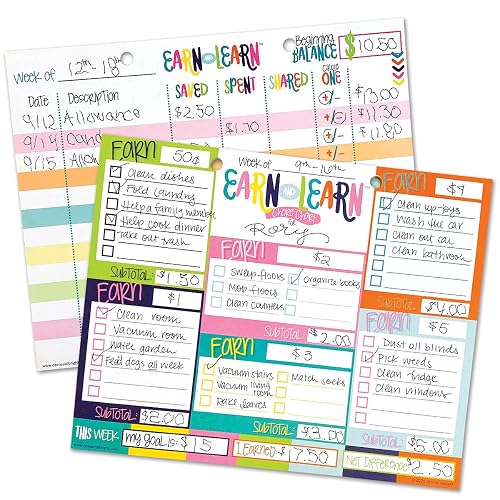
A fillable chore chart template gives you a ready-made grid you can customize in a few minutes, print or edit on screen, and reuse every week. In this guide, you will learn how to pick the right fillable chore chart template for your household, set up the chore list, assign jobs by age, and keep the system running without nagging. By the end, you will have a working chart on your fridge or tablet and a short routine for checking it.
Why a Fillable Chore Chart Template Works Better Than Starting From Scratch
Blank paper charts tend to get messy after a week. A fillable chore chart template keeps the layout consistent, so the chore names, days and check boxes always line up. You only change the parts that matter: the chores, the names and the rewards. For a busy mom, that means less time designing and more time actually using the chart.
Shopping for one? See our guide: Chore Chart Templates Free Printable: 3 Best Picks for Busy Families (2026).
Fillable versions come in three common forms. Editable word-processing files let you type directly into boxes. PDF forms can be filled on a computer or tablet and then printed. Spreadsheet versions let you change the chores and automatically add totals. Each format has its place, and the steps below work for all of them.
Step 1: Decide What Kind of Chart Your Family Needs
Before you open any file, decide how often the chart will refresh. Some families do best with a daily checklist for young kids, while others prefer a weekly grid with a Saturday reset. If you are unsure, start weekly. It gives enough room for recurring jobs like trash night and laundry without overwhelming a six-year-old.
If you want something more flexible, look for a template that has space for both daily and weekly tasks. Our guide to Daily Weekly Monthly Chore Chart Template: 7 Steps to Build One That Works explains how to combine those timeframes on one page.
Step 2: Choose the Right Template Format
Match the file type to how you will use the chart:
- Printable PDF: Best for a fridge or bulletin board. Print a fresh copy each week or laminate one and use a dry-erase marker.
- Editable document: Best when chores change often. You can retype names and tasks without rebuilding the table.
- Spreadsheet: Best when you want to track points, rewards or completion rates over several months.
If you already know you want to edit in a word processor, our article on Word Chore Chart Template: 7 Steps to a Printable Setup Your Family Will Use walks through the formatting details. For tallying with formulas, see Chore Chart Excel Template: 7 Steps to Build a Weekly Tracker.
Step 3: Fill In the Header and Family Columns
Start with the basic information at the top of the template. Most fillable versions include a title, a week-of date and a column for each family member. Keep these details simple:
- Enter the week’s start date (for example, Monday, March 2).
- List each person in their own column, using first names or initials.
- Assign a color or small icon to each child if the chart is for early readers.
Limit the family columns to what the chart can hold clearly. Four or five people usually fits on a standard letter-size page. If you have more, consider two charts, one for the younger kids and one for older kids.
Step 4: List Chores by Category and Age
Group chores so kids can see patterns. Common categories include:
- Daily (make bed, feed pet, clear dishes)
- Weekly (vacuum a room, sort laundry, clean bathroom sink)
- As-needed (take out trash when full, unload dishwasher)
Age guidelines are a useful starting point, though you know your kids best. Many parents begin with two or three small jobs for preschoolers, such as putting toys in a bin or matching socks. School-age children can usually handle five to eight tasks a week, including some that take 15 to 30 minutes. Teens often take on bigger responsibilities like cooking a simple dinner once a week or washing the car.
Sub-step: Write Each Chore as an Action
Write chores in a clear, action-based way. “Clean room” is vague. “Put clothes in hamper and make bed” is specific. Specific wording cuts down on arguments about whether a job is finished.
Sub-step: Mark Chores That Need a Time Limit
For tasks like dusting or cleaning the bathroom, add a time estimate such as “10 minutes.” Kids can then plan their afternoon instead of guessing how long the job will take.
Step 5: Set Up a Rotation So No One Gets Stuck With the Worst Job
If the same child always gets the dog poop duty, the chart will fall apart. Rotating jobs keeps the workload fair. You can rotate weekly by moving names down one row, or let kids trade if they agree. Our guide to Rotating Chore Chart Template: 7 Steps to a Setup That Keeps Everyone Working covers several rotation patterns in detail.
Step 6: Add a Simple Reward or Check System
Decide what happens when a chore is done. Some families use stickers or check marks, while others attach points to a weekly allowance or privilege. Keep the system easy to explain in one sentence, such as “Each check mark earns 25 cents” or “Finish all jobs by Sunday for movie night.”
Leave the completion boxes large enough for a pen or marker. Kids who are learning to write often find tiny boxes frustrating.
Step 7: Review the Chart and Reset Weekly
A chart only works if someone checks it. Pick a fixed time, such as Sunday evening, to review the week together. Look at what was completed, talk about anything that was hard to finish, and decide whether a job needs to be shorter or moved to a different day. Then print or clear the chart for the next week.
Quick Setup Checklist
- Choose weekly, daily or combined timeframe
- Pick PDF, document or spreadsheet format
- Enter week dates and family names
- List 3 to 8 chores per person, age-appropriate
- Write each chore as a specific action with a time estimate
- Set a rotation rule and reward system
- Schedule a weekly review time
Common Mistakes to Avoid
- Too many chores at once. Start with fewer tasks and add more after two or three weeks of consistent completion.
- Vague wording. “Help with dishes” leads to disputes. “Load dishwasher after dinner” does not.
- Never updating the template. Kids grow, schedules change and some jobs stop making sense. Revisit the chart every month or two.
- Skipping the review. A chart that is never discussed quickly becomes wallpaper.
- Using a tiny layout for young kids. Large boxes and simple icons help children who cannot yet read well.
Tips for Making the Chart Stick
Hang the printed chart at the child’s eye level and near the place where the chore happens. A reminder about feeding the cat works best next to the pet bowl. For older kids, a shared digital file they can update on a tablet may feel more natural than paper.
Keep a backup printout in a folder. When you need to start over, you will not have to rebuild everything. If you want to compare layouts, our article on Printable Weekly Chore Chart Template: 7 Steps to a Setup That Works offers a useful side-by-side idea of how different grids function.
Recommended gear
A few simple supplies make a fillable chore chart template easier to use every day:
- Dry-erase markers in several colors: Useful for laminated charts so you can wipe and reuse the grid each week. View on Amazon
- Laminating pouches: These protect a printed chart from kitchen splashes and small hands. View on Amazon
- Magnetic clipboard or fridge clip: Holds the chart in a visible spot and lets you move it when you reprint. View on Amazon
- Star or sticker reward chart stickers: Give younger children a satisfying way to mark finished chores. View on Amazon
FAQ
Can I edit a fillable chore chart template after I download it?
Yes, if the file is a Word document, Google Docs file or spreadsheet, you can change chore names and dates directly. Some PDF forms are fillable too, but they may not let you add new rows. In that case, use a document version instead.
How many chores should a child have each week?
Many families start with three to five chores for younger school-age children and expand to eight or so as kids get older. Pick a number you can keep consistent for at least two weeks before adding more.
Should I print a new chart every week?
You can, or you can laminate one copy and reuse it with dry-erase markers. Printing weekly is helpful if you want a record of completed chores. Laminating works well for a steady routine.
What if my kids do not finish their chores?
Review the chart together and find out why. The job may be too long, unclear or scheduled at a busy time. Adjust the chore instead of only adding a consequence, and keep the reward system clear.
Is a digital chore chart better than paper?
It depends on your family. Digital charts are easy to update and share on phones, while paper charts are visible to everyone in the kitchen. Many families use both: a printed master and a shared file for changes.
How do I handle chores for kids on different schedules?
Use separate columns for each child and mark which days they are home or away. Weekend tasks can be grouped so the workload stays balanced across the week.
Can a chore chart help with teens who resist chores?
Often yes, especially when teens help choose their jobs and the rules are written down. Give them more responsibility, such as meal prep or yard work, and let them take ownership of a shared system.
When should I replace the template?
Replace it when children outgrow the tasks, when the layout no longer fits your schedule, or when the chart stops being used. A fresh layout can renew interest in the routine.
Conclusion
A fillable chore chart template saves time by giving you a consistent layout you can customize in minutes. Choose the right format, write clear chores for each child’s age, rotate jobs fairly and review the chart every week. With a short routine and a few simple supplies, your family can keep the household running without constant reminders.
Related reading
- Word Chore Chart Template: 7 Steps to a Printable Setup Your Family Will Use
- Weekly Chore Chart Template Free: 7 Steps to a Printable Setup That Works
- Template for Chore Chart: 7 Steps to a Printable Layout Kids Can Use
- Rotating Chore Chart Template: 7 Steps to a Setup That Keeps Everyone Working
- Printable Weekly Chore Chart Template: 7 Steps to a Setup That Works
- Printable Customizable Family Chore Chart Template: A Practical Guide (2026)
Ready to choose one?
About Emily Parker
Emily Parker is part of our editorial team and reviews and edits our busy-mom life guides, checking product details against manufacturer specifications and owner feedback.