 By Audrey Hayes
Updated November 2026
Family command center organization comes down to one spot in your home where schedules, chores, meals, mail and permission slips all live together. In this guide, you’ll pick the right location, set up distinct zones, choose the tools that fit your household, and build a simple weekly routine so the system keeps working after the first week. Most busy families can have a working setup in an afternoon.
Why a Family Command Center Works
Most household chaos comes from information being scattered. One child’s soccer schedule lives in a text thread, a field trip form is buried in a backpack, and the grocery list is on a sticky note that fell behind the counter. A command center gives every family member one place to check and one place to drop information. It doesn’t have to be fancy. It just has to be consistent.
Shopping for one? See our guide: Family Support Organization Burlington County NJ: 9 Best Options Compared.
The payoff is fewer forgotten items, fewer last-minute scrambles, and fewer repeated questions like “What time is practice?” Parents often find that the biggest gain is mental: you stop carrying every detail in your head.
Step 1: Choose the Right Location
Pick a spot that every person passes at least once a day. Common choices include the kitchen wall near the back door, a hallway by the stairs, or the wall beside the main entry. Avoid tucking it into a home office or a bedroom, because the people who need it most will rarely stop there.
Check these practical points before you commit:
- Is there a 3-foot-wide stretch of open wall or a cabinet surface at about standing eye level?
- Is there an outlet nearby if you plan to use a charging station or a small display?
- Will the area stay reasonably dry? Avoid spots directly next to the sink or a door that gets wet weather tracked in.
- Can the space handle a few pounds of paper and a pen cup without looking cluttered?
Step 2: Gather Your Tools and Supplies
Before you hang anything, collect the basics. You’ll need a large wall calendar or whiteboard, a set of labeled file folders or a wall pocket organizer, a cork board or magnetic board, and a supply caddy for pens, scissors and tape. A dry-erase marker in each color assigned to a family member is a surprisingly useful touch.
A simple supply checklist:
- One monthly wall calendar, at least 11 by 17 inches
- A dry-erase board or chalkboard for the current week
- A cork or magnetic board for photos, notes and reminders
- Wall pocket organizer or clear sheet protectors for papers
- Labeled bins or trays for incoming mail and forms
- A pen cup with at least two dry-erase markers and a pencil
- Painter’s tape or removable hooks so you don’t damage the wall
Step 3: Divide the Space Into Zones
A command center works best when each job has its own zone. Think of the wall as a set of short-term and long-term areas. Most families do well with five zones:
- Calendar zone: The monthly calendar sits in the center, with one color per person.
- This week zone: A whiteboard or weekly grid shows practices, appointments and early-morning duties for the next seven days.
- Action zone: Items that need a response go here, such as permission slips, bills, and RSVP cards. Use a folder labeled “To Do” and a folder labeled “To File.”
- Chore and routine zone: A chart with magnetic tokens or a checklist shows daily jobs.
- Meal zone: A dinner plan, grocery list, and a “use this week” produce list live here.
If you’re short on space, combine the action and chore zones. Keep the calendar and this-week zones separate, since those are the two you’ll check most often.
Setting Up the Calendar Zone
Write every recurring commitment on the monthly calendar first: work shifts, sports, music lessons, and standing appointments. Then add one-time events. Assign each family member a marker color and stick to it. If a color is used for both school events and a parent’s work travel, people will misread the board, so keep it clear.
Setting Up the This Week Zone
Every Sunday evening, copy the week’s events from the monthly calendar onto a weekly grid. Use columns for days and rows for each person. Include the time and the place for anything that needs a ride, a packed lunch or special clothing. This is the page people will glance at while they’re putting on shoes, so keep the wording short.
Step 4: Build a Weekly Routine
A command center fails when it becomes a place where things go to die. You need a short routine to keep it current. A practical rhythm looks like this:
- Sunday, 15 minutes: Update the weekly grid, review the calendar for the next two weeks, and check the meal plan.
- Daily, 2 minutes: Each morning, glance at the board. Move completed items into the file folder and clear anything no longer relevant.
- Midweek, 5 minutes: Scan the action folder, respond to any forms and sign anything that needs a signature.
- Monthly, 20 minutes: Archive old papers, update the chore chart, and refresh the grocery staples list.
Assign one adult to lead the Sunday reset, and rotate the job with a partner or older child if you can. Shared ownership keeps the system from depending on a single person’s memory.
Step 5: Involve Every Family Member
A command center only works if the people who live with it use it. Give each child a small section that belongs to them, such as their own color marker, a shelf for homework papers, or a chore row. Younger kids can handle stickers or magnets. Teens can take over the weekly grid entirely.
Explain the rules out loud, once, and then stick to them. For example: “If it’s not on the board, it isn’t scheduled.” Or: “Anything that needs a signature goes in the red folder.” Clear, repeated rules do more than any label maker.
Tools Comparison
Here’s a quick look at common formats so you can match a tool to your home:
| Format | Best For | Main Drawback |
|---|---|---|
| Dry-erase whiteboard | Weekly schedules and quick notes | Needs regular cleaning and can smudge |
| Paper wall calendar | Long-range planning and handwritten detail | Can’t be shared outside the house |
| Cork or magnetic board | Photos, reminders and paper items | Pins can damage painted walls |
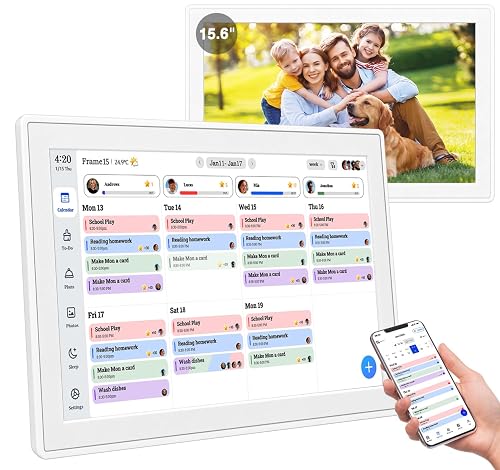
| Shared digital calendar on a wall display | Families with many outside commitments | Requires setup and a reliable power source |
| Wall pocket organizer | Mail, forms and permission slips | Papers can pile up if not emptied weekly |
Many families combine two or three formats. A paper calendar plus a whiteboard and a pocket organizer covers most needs. If you’re comparing options in more depth, the Family Organization Products: What Actually Helps guide walks through specific product types, and Family Organization System: Calendars, Plans, Checklists covers how to pair them.
Tips for a Command Center That Lasts
- Use a single color for each person across the calendar, the whiteboard and the chore chart.
- Put the mail and forms bin right next to the calendar so papers go to one place.
- Keep a pen on a string or in a cup. Missing pens are the most common reason a board goes blank.
- Photograph the whiteboard each Sunday before you erase it. You’ll have a record if someone asks about last week.
- Start with just the calendar and one other zone. Add more once the habit is solid.
Common Mistakes
- Placing it out of sight. A hidden command center gets ignored. Choose a high-traffic spot.
- Trying to do everything at once. Build the calendar first, then add zones gradually.
- Skipping the weekly reset. Without a set time to update, the board falls behind within days.
- Overloading the wall. Too many notes, photos and bins make it hard to find anything. Edit ruthlessly.
- Using a single owner. If only one adult knows how it works, the system collapses when that person is busy or away.
- Ignoring kids’ input. Children are more likely to use a system they helped design.
Recommended Gear
These products fit well into a family command center setup. Choose the sizes and styles that match your wall space.
- Large magnetic dry-erase calendar board gives you a monthly grid and room for weekly notes in one surface, which keeps the calendar and this-week zones together. View on Amazon
- Wall-mounted pocket organizer with clear pockets holds mail, forms and permission slips so papers have one home. View on Amazon
- Cork bulletin board with a wood frame gives you room for photos, school flyers and reminder cards without damaging paint when used with proper hanging hardware. View on Amazon
- Magnetic chore chart with tokens makes daily jobs visible and lets younger kids move their own progress markers. View on Amazon
FAQ
Where is the best place to put a family command center?
Choose a wall that everyone passes at least once a day, such as the kitchen, a hallway near the entry, or beside the back door. Avoid spots that are hard to reach or that get wet from sinks and outdoor weather.
How big should the command center be?
A wall space about 3 feet wide and 3 to 4 feet tall works for most families. Smaller homes can use a cabinet door or a single board. The size matters less than whether the area is easy to see and reach.
Should I use a paper calendar or a digital one?
Many families use both. A paper or whiteboard calendar is visible to everyone at a glance, while a shared digital calendar helps with outside activities and reminders. Pick the format that your household will actually check.
How often should the command center be updated?
Plan a 15-minute reset every Sunday, a quick daily glance, and a monthly cleanup. The weekly reset is the most important habit because it keeps the board accurate.
How do I get kids to use the command center?
Give each child a color, a small section, and a job, such as updating their own activities or moving their chore token. Clear, repeated routines work better than reminders.
What should go in the action folder?
Anything that needs a response or signature belongs there, such as permission slips, bills, invitations and school notices. Check it midweek and empty it completely once tasks are done.
Can a command center work in a small apartment?
Yes. Use a single over-the-door organizer, a small whiteboard, and a hanging pocket file. The principle is the same: one visible place for schedules, papers and reminders.
What if the system stops working?
Go back to the basics. Clear the board, reset the calendar for the month, and restart the Sunday routine. Simplify the zones if they feel crowded. Most breakdowns come from too much detail rather than too little.
Conclusion
A family command center gives everyone one place to find schedules, chores, meals and papers. Pick a visible location, set up a few clear zones, and build a short weekly reset that keeps the information current. Start small, involve your family, and expand the system only when the basics feel automatic.
Related reading
- DIY Family Organization Center: A Step-by-Step Build for Busy Homes
- Laundry Organization for Large Family: 9 Best Picks for Busy Homes
- Large Family Shoe Organization: 7 Steps to a Tidy Entryway
Ready to choose one?
About Audrey Hayes
Audrey Hayes is part of our editorial team and reviews and edits our busy-mom life guides, checking product details against manufacturer specifications and owner feedback.